ProxySQL Link to heading
ProxySQL is a high-performance proxy for MySQL and compatible servers. You typically use:
- 6032: Admin interface (configure ProxySQL using SQL).
- 6033: MySQL traffic interface (your applications connect here).
Goals Link to heading
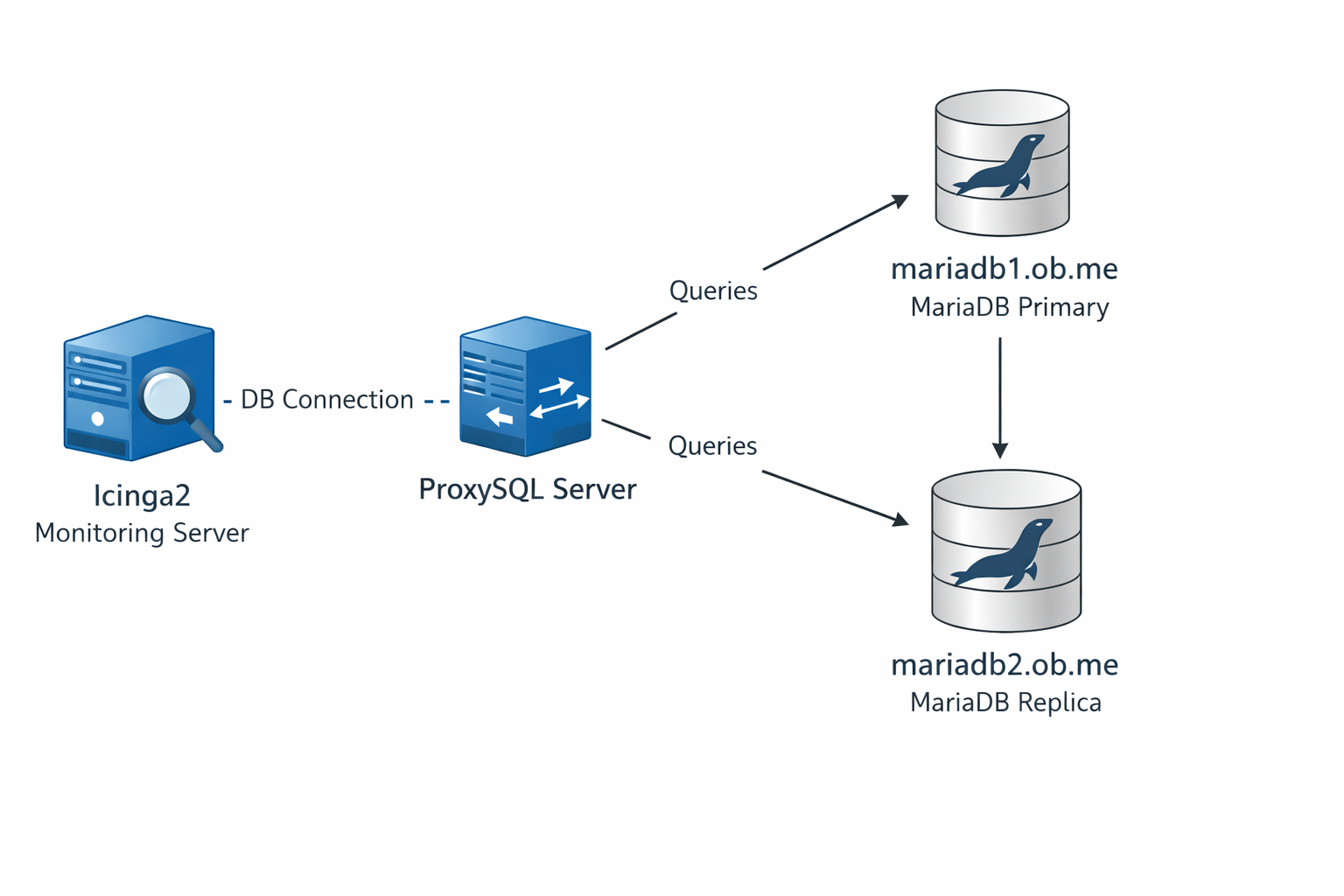
The final implementation would look like this:
Installation Link to heading
We will focus on installing and configuring on Debian OS.
sudo apt-get update
sudo apt-get install -y --no-install-recommends lsb-release wget apt-transport-https ca-certificates

sudo wget -nv -O /usr/share/keyrings/proxysql-3.0.x-keyring.gpg \
  'https://repo.proxysql.com/ProxySQL/proxysql-3.0.x/repo_pub_key.gpg'

echo "deb [signed-by=/usr/share/keyrings/proxysql-3.0.x-keyring.gpg] https://repo.proxysql.com/ProxySQL/proxysql-3.0.x/$(lsb_release -sc)/ ./" \
  | sudo tee /etc/apt/sources.list.d/proxysql.list

sudo apt update -y
sudo apt install -y proxysql

sudo systemctl enable --now proxysql
sudo systemctl status proxysql --no-pager
ProxySQL Interfaces Link to heading
On installation, ProxySQL listens on 2 ports:
- 6032/tcp
- 6033/tcp
6033 is commonly used as a proxy port, similar in spirit to 3306, which is the default port of MySQL/MariaDB.
Port 6032/tcp is used for the ProxySQL admin interface. Port 6033/tcp is used for application traffic.
ProxySQL Admin Interface Link to heading
On the ProxySQL host:
mysql -u admin -padmin -h 127.0.0.1 -P6032 --prompt='ProxySQL (Admin)> '
This is the default documented admin login example.
Configuration Layers Link to heading
ProxySQL uses a multi-layer configuration model.
- Memory
- Runtime
- Disk
Changes are applied to the in-memory configuration tables, then loaded to runtime. For persistence across restarts, changes must also be saved to disk.
Example:
SET admin-restapi_enabled='true';
LOAD ADMIN VARIABLES TO RUNTIME;
SAVE ADMIN VARIABLES TO DISK;
Minimal configuration to kickstart things Link to heading
- Update the admin password, and create a new user for remote administration.
By default,
adminis intended for local use.
SET admin-admin_credentials="admin:p@$$w0rd;radmin:rp@$$w0rd";
- Allow remote connections to ProxySQL server. By default, ProxySQL admin interface listens only on localhost.
SET admin-mysql_ifaces="0.0.0.0:6032";
We load these variables to the runtime and save it to our disks.
LOAD ADMIN VARIABLES TO RUNTIME;
SAVE ADMIN VARIABLES TO DISK;
Saving to disk means ProxySQL persists the configuration in its internal SQLite database.
Remote administration can be done with a MariaDB/MySQL client using a config similar to:
user=radmin
password=p@$$w0rd
host=<proxysql server ip>
port=6032
- Update MySQL monitor variables. The monitor user is used for health checks against MySQL/MariaDB backends.
SET mysql-monitor_username="monitor";
SET mysql-monitor_password="p@$$w0rd";
- Update the MySQL traffic interface (optional). If an application cannot connect to a non-default port, the default 6033 listener can be changed to 3306.
SET mysql-interfaces="0.0.0.0"3306";
This concludes the minimal configurations needed to get started with ProxySQL.
MySQL/MariaDB Server related configurations Link to heading
The user monitor should be created and given some privileges.
CREATE USER 'monitor'@'%' IDENTIFIED BY 'p@$$w0rd';
GRANT USAGE ON *.* TO 'monitor'@'%';
GRANT REPLICATION CLIENT ON *.* TO 'monitor'@'%';
When using ‘%’ as host, tighten security using firewall rules and network ACLs.
Adding MySQL/MariaDB servers to ProxySQL Link to heading
For this blog, consider a simple asynchronous replication, where 2 servers act like primary and replica.
- mariadb1.ob.me: primary
- mariadb2.ob.me: replica
INSERT INTO mysql_servers(hostgroup_id, hostname, port, weight, comment)
VALUES
  (0, 'mariadb1.ob.me', 3306, 10000, 'mariadb1'),
  (1, 'mariadb2.ob.me', 3306, 10000, 'mariadb2'),
  (1, 'mariadb1.ob.me', 3306, 1, 'mariadb1 backup reader';
If the configuration above is applied to runtime, all traffic will go only to 1 server (hostgroup 0). Additional entries are required so the database servers can be used efficiently.
INSERT INTO mysql_replication_hostgroups
VALUES (0, 1, 'read_only', 'single-writer routing');
There are a few acceptable checks that can be performed to determine which servers will go to hostgroup 0 (writer hostgroup), and hostgroup 1 (reader hostgroup). More can be found by executing SHOW CREATE TABLE mysql_replication_hostgroups\G.
mariadb2.ob.me has the variable “read_only” enabled.
When loading the MySQL/MariaDB servers to runtime, the monitor user connects to the databases and checks parameters such as “read_only” to decide which server is assigned to which hostgroup.
LOAD MYSQL SERVERS TO RUNTIME;
SAVE MYSQL SERVERS TO DISK;
Q: Why add mariadb1.ob.me to hostgroup 1?
A: If mariadb2 is down, mariadb1 will still receive the SELECT queries.
Is the configuration complete? Not yet.
At this stage, variables have been configured, MariaDB servers have been added, and hostgroup logic has been defined. Application users must also be added.
Icinga2 and Icingaweb2 are deployed, so those users are added on the ProxySQL server.
INSERT INTO mysql_users (username, password, default_schema, comment)
VALUES
("icinga2", "*HASHEDPWORDFROMMYSQLUSER", "icinga2", "Icinga 2 monitoring user"),
("icingaweb2", "*HASHEDPWORDFROMMYSQLUSER", "icingaweb2", "Icingaweb2 user");

LOAD MYSQL USERS TO RUNTIME;
SAVE MYSQL USERS TO DISK;
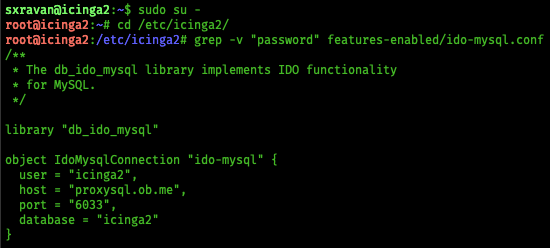
In icinga2, DB host will be the IP of ProxySQL, DB port will be the Application Port of ProxySQL.
Adding Query Rules to re-direct traffic Link to heading
This is the table which tells which query should be executed on which server.
For advanced DBA use cases, the tables from the stats database can be useful for query analytics.
To keep it simple, all pure SELECT (read-only) queries are sent to hostgroup 1.
SELECT .* FOR UPDATE, or SELECT statements using locks, are sent to hostgroup 0.
INSERT INTO mysql_query_rules (rule_id,active,match_digest,destination_hostgroup,apply)
VALUES
  (10,1,"^SELECT.*FOR UPDATE",0,1),
  (11,1,"^SELECT.*LOCK IN SHARE MODE",0,1),
  (12,1,"^SELECT\\s+GET_LOCK\\s*\\(",0,1),
  (20,1,"^SELECT",1,1);
rule_id = 20 has destination_hostgroup set to 1. This line matches every “SELECT” query that is not related to locks and routes it to hostgroup 1.
The above is one approach. Another approach, when using a custom application, is to use two users, for example:
- user-rw
- user-ro
A query rule can be added so that every query executed by user-ro is routed to hostgroup 1.
After writing all query rules, they must be loaded to runtime and saved to disk.
LOAD MYSQL QUERY RULES TO RUNTIME;
SAVE MYSQL QUERY RULES TO DISK;
There is no single correct way to use ProxySQL. It is flexible, and it has a strong knowledge base.